You can connect your own Subdomain to Veshort so your links look fully branded — like go.yourbrand.com or link.yourbrand.com.
✅ Before You Begin
- Make sure you have access to your domain’s DNS settings. These are usually managed at your domain registrar (e.g., Namecheap, GoDaddy, Cloudflare, Porkbun, Google Domains).
- Remove any existing A or AAAA records for the domain you’re connecting to prevent conflicts with your new CNAME record.
- Allow time for propagation. DNS updates can take 15 minutes to 36 hours to fully apply.
- We strongly recommend managing your DNS with Cloudflare, which automatically handles SSL, improves performance, and enhances reliability.
☁️ Why We Strongly Recommend Cloudflare
You can connect your domain using any DNS provider, but Cloudflare gives the smoothest and fastest setup.
Using Cloudflare DNS provides:
- Instant & automatic SSL (no waiting).
- CNAME flattening that allows root domains (yourbrand.com) to work without A records.
- Faster global CDN performance and better caching.
- Improved security & stability via Cloudflare’s edge network.
- Fewer DNS problems compared to many registrars.
- No manual SSL management required on Veshort.
Most Veshort users who add branded domains use Cloudflare because it reduces setup time and avoids common DNS problems.
If you’re new to Cloudflare, here are helpful guides:
- How to Create a Cloudflare Account
- How to Add Your Domain to Cloudflare
- How to Change Your Nameservers to Cloudflare
How to Connect a Subdomain
Using a subdomain like link.yourbrand.com is the easiest and most compatible option.
Step-by-Step Process
- Log in to your DNS provider (Cloudflare, GoDaddy, Namecheap, Porkbun, etc.).
- Select the domain you want to add and find your DNS Zone or Manage DNS section.
Add a new record:
Type: CNAME
Name / Host: link
Target: cname.veshort.com
TTL: Auto or 3600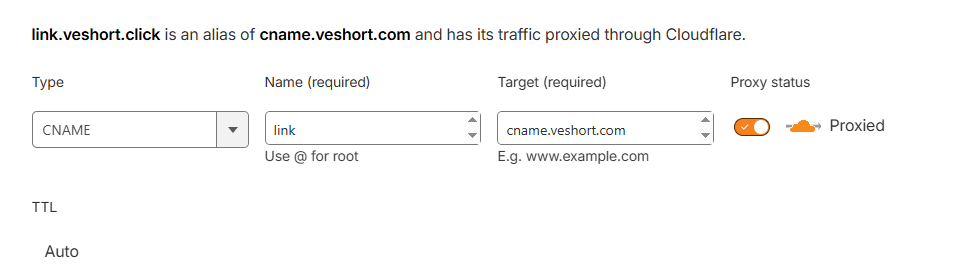
You can choose any name for your subdomain like go, link, links, qr, get, etc. Just make sure to add that name in the Name/Host section.
- Click Save.
Add the Domain in Veshort
- Go to your Veshort Dashboard → Branded Domains → Add New Domain.
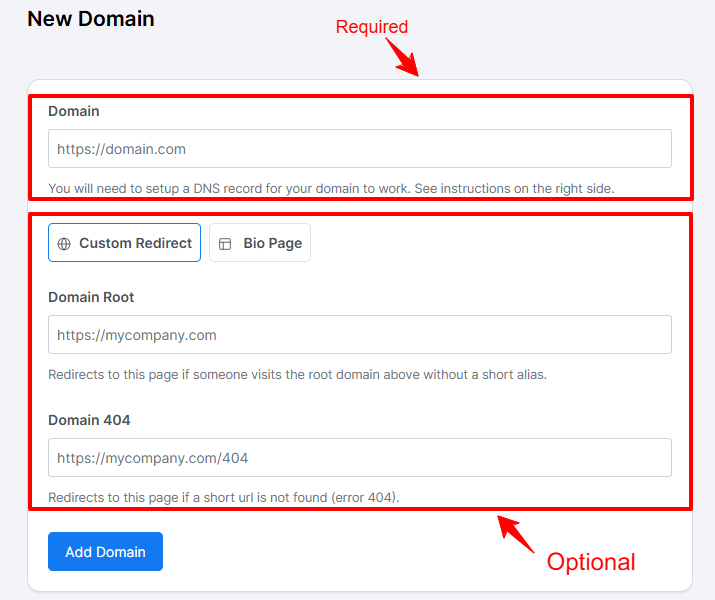
In the form that appears, fill in the following details:
- Domain (required): Enter the domain you configured in your DNS with https (for example,
https://link.yourbrand.com). - Bio Page (optional): Choose this option if you want your bio page to appear on the root of your domain.
- Domain Root (optional): Set a redirect destination if someone visits your domain or subdomain without a specific short link.
- Domain 404 (optional): Add the URL for your custom 404 (Not Found) page. This page will appear if a short link no longer exists.
- Domain (required): Enter the domain you configured in your DNS with https (for example,
- Click Add Domain.
- Wait for DNS propagation (usually within 15–30 minutes). Once complete, your domain will automatically connect to Veshort.
Note: if you are not using Cloudflare, then it may take 24 hours to activate SSL from our side, or you can use Cloudflare to get the ssl sooner.
✅ That’s it! Your subdomain is now connected and ready to use with Veshort.